

Elementor WordPress page builder is one of the most powerful and widely used visual website-building tools available today. It allows businesses, developers, and designers to create professional, responsive WordPress websites using a real-time drag-and-drop editor — without writing complex code.
In the fast-evolving world of web design, Elementor continues to stand out by combining ease of use with advanced customization options. At SB Code Lab, we rely on Elementor to deliver high-performance, scalable, and SEO-friendly WordPress websites tailored to modern business needs.
Top Features You Can’t Miss
1. Drag-and-Drop Visual Editor
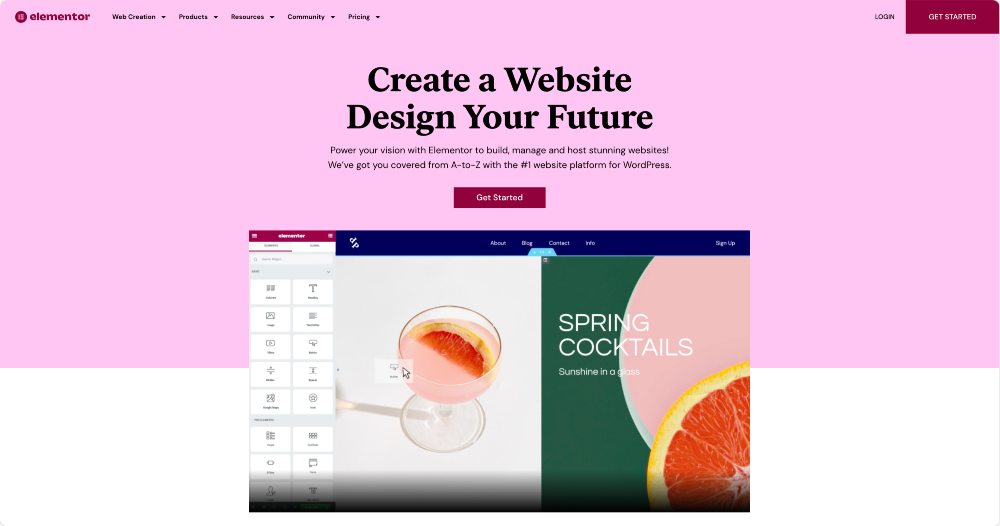
Elementor’s most compelling feature is its intuitive front-end editor. Simply drag widgets into place and build your page visually — no coding experience required. It’s ideal for designers, marketers, and agencies who want full control over layout and content.
2. Pre-Built Templates & Blocks
Elementor comes with a library of professionally designed templates and blocks that you can import and customize in minutes. This speeds up development and ensures consistent, polished design.
3. Responsive Design Controls
Designs made with Elementor are responsive by default. You can fine-tune layouts for desktop, tablet, and mobile — optimizing the user experience on every device.
4. Built-In Widgets & Functionality
With over 90+ widgets, Elementor covers everything from images and buttons to advanced forms, sliders, pricing tables, and more. This gives you extensive layout and functionality options out of the box.
5. Theme Builder & Full Site Editing
The Theme Builder lets you visually design headers, footers, blog templates, and all dynamic site parts — bringing full design freedom to your WordPress themes.
6. WooCommerce Integration
For e-commerce projects, Elementor empowers you to design product pages, cart layouts, and checkout experiences that convert better — all visually, without custom coding.
7. Popup & Marketing Tools
With Elementor Pro, you gain access to a Popup Builder with behavior-based triggers (exit intent, scroll, etc.), helping you capture leads and enhance conversions without third-party plugins.
8. AI-Driven Capabilities (Next-Gen Workflow)
Elementor now includes AI writing and design tools that help generate content, refine copy, translate languages, and even suggest tone adjustments — all within the editor. These tools help speed up the design process and elevate your workflow.
Why Elementor Matters for Businesses in 2026
Elementor’s blend of flexibility, ease of use, and powerful design capabilities makes it ideal for small businesses, agencies, and enterprise projects alike. You can:
✅ Launch sites faster, reducing development costs
✅ Create custom experiences without deep technical knowledge
✅ Maintain and update sites quickly from the WordPress dashboard
Additionally, Elementor integrates with popular SEO and performance tools, making it easier to optimize your site for rankings and speed.
Elementor Performance, SEO & Developer-Friendly Features
Beyond visual design, the Elementor WordPress page builder has matured into a performance-conscious and developer-friendly platform — a key reason agencies like SB Code Lab continue to rely on it for scalable projects.
Performance Optimization Capabilities
Elementor has significantly improved performance in recent updates. Features such as:
- Optimized DOM output
- Load icons inline option
- Lazy loading for images and background assets
- Reduced CSS print method
help ensure Elementor-built websites meet Core Web Vitals benchmarks when configured correctly.
When combined with proper hosting, caching, and image optimization, Elementor websites can achieve excellent page speed and Lighthouse scores.
SEO-Ready Structure
From an SEO standpoint, the Elementor WordPress page builder integrates seamlessly with popular SEO plugins like Yoast SEO, Rank Math, and All in One SEO. Key SEO benefits include:
- Clean HTML markup
- Proper heading hierarchy (H1–H6 control)
- Schema-friendly layouts
- Optimized image alt text management
This makes it easier to build pages that rank well without relying on custom development.
Custom CSS & Developer Hooks
While Elementor is beginner-friendly, it doesn’t limit advanced users. Developers can:
- Add custom CSS per widget, section, or page
- Use dynamic content from ACF, Pods, and Toolset
- Extend functionality using hooks and filters
- Build reusable design systems with global styles
This hybrid flexibility makes Elementor suitable for simple landing pages as well as enterprise-level WordPress builds.
Role-Based Editing & Client Management
For agencies and businesses, Elementor offers role manager settings that restrict what clients can edit. This prevents accidental layout damage while still allowing content updates — a major advantage for long-term website maintenance.

Tips for Best Results
Here are some best practices when using Elementor:
✔ Choose a lightweight theme such as Hello Elementor for best performance.
✔ Use templates and global styles for brand consistency.
✔ Keep mobile responsiveness top of mind.
Conclusion
If you want to build modern, engaging WordPress websites without sacrificing performance or design flexibility, the Elementor WordPress page builder should be at the top of your toolkit. From drag-and-drop layouts to advanced AI tools and e-commerce support, Elementor continues to lead the page builder space in 2026.
At SB Code Lab, we specialize in crafting custom WordPress solutions with Elementor that are optimized for conversions, speed, and brand success. Let’s build something extraordinary!