

A website accessibility audit is one of the most important steps for any organization working toward ADA and WCAG 2.2 compliance. As digital experiences expand across devices, platforms, and interaction patterns, accessibility can break without warning. A structured, repeatable audit process helps teams identify risks, improve usability, and support legal compliance across all digital properties.
This guide explains how to perform a complete accessibility audit, the tools you need, common issues you will encounter, and the steps required to carry out reliable testing. It is written for decision-makers, developers, designers, and compliance teams who aim to meet modern accessibility standards with accuracy and confidence.
What Is a Website Accessibility Audit?
A website accessibility audit is a structured assessment used to measure how well a website meets accessibility guidelines, especially ADA Title III and WCAG 2.2. These audits uncover barriers that affect users with visual, auditory, motor, and cognitive limitations. The goal is to confirm that every visitor can read content, interact with components, and complete actions without difficulty.
An audit typically includes:
- Automated scans
- Manual WCAG evaluation
- Keyboard-only tests
- Screen reader checks
- Mobile accessibility review
- Document and media review
- Code-level inspection for patterns that affect accessibility
An audit is required when:
- Building a new website
- Making a major redesign
- Meeting ADA or industry compliance mandates
- Reducing legal exposure
- Supporting a consistent UX across teams and devices
For readers who want a deeper understanding of ADA rules before beginning the audit process, refer to the internal guide on Americans with Disabilities Act compliance here: https://accessibilityassistant.com/blog/accessibility-insights/guide-americans-with-disabilities-act-compliance/
Why Accessibility Audits Are Essential for Modern Websites

Accessibility is no longer optional. Regulatory bodies, courts, and global standards call for digital access for all users. Beyond compliance, accessibility audits help improve usability, reduce friction, and support inclusive design.
1. Higher Legal Risk
ADA Title III lawsuits continue to increase. Most cases start with simple issues such as low contrast, missing labels, or inaccessible forms.
2. Constant UI Changes
A single website update, new banner, new colour, revised menu, plugin upgrade—can create accessibility issues even if previous audits passed.
3. Better User Experience
Accessible interfaces support:
- Clear reading
- Logical structure
- Smooth interaction patterns
- Better mobile performance
4. Impact on Conversions
Users stay longer and complete actions when content is readable, and interactions are predictable.
Types of Website Accessibility Audits
There is no single audit method that captures every issue. Strong audits combine automated, manual, and real-assistive-technology testing.
1. Automated Audits
Automated tools check common WCAG violations, such as:
- Missing labels
- Low contrast
- Empty buttons
- Incorrect landmarks
- ARIA errors
However, automated scans detect only 20–30% of real issues.
2. Manual Audits
Specialists inspect:
- Colour contrast
- Focus behaviour
- Keyboard order
- Interaction patterns
- Form behaviour
- Semantic structure
Manual audits discover issues that automation cannot catch.
3. Assistive Technology Testing
Testing with real tools helps uncover genuine usability barriers:
- NVDA
- JAWS
- VoiceOver
- TalkBack
- Screen magnifiers
- Voice input tools
4. Hybrid Audits
A combined approach delivers the most accurate picture and supports reliable WCAG 2.2 alignment.
Accessibility Audit Checklist (WCAG 2.2 + ADA Alignment)

The checklist below includes the most important categories for a complete website accessibility audit.
1. Text and Visual Accessibility
- Minimum contrast ratios
- Readability at different sizes
- Resizing without breaking layout
For readers looking to understand colour contrast in real projects, refer to this internal guide: https://accessibilityassistant.com/blog/accessibility-insights/how-to-apply-wcag-22-colour-contrast-accessibility/
2. Images and Media
- Alt text for non-decorative images
- Descriptive naming
- Transcripts for audio
- Captions for video
3. Navigation and Structure
- Logical heading order
- Keyboard access for all components
- Visible focus indicators
- Skip links where needed
4. Forms and Interactions
- Accurate labels
- Clear instructions
- Error feedback
- Logical focus path
5. ARIA and Semantic HTML
- Correct roles
- Landmarks
- Minimal ARIA usage
6. Dynamic UI Components
- Accessible modals
- Predictable carousels
- Toggle elements
- Tabs and accordions
7. Mobile Accessibility
- Touch target sizing
- Orientation support
- Pinch-and-zoom functionality
8. Document and PDF Review
- Tagged content
- Reading order
- Alt text inside documents
Tools to Use During a Website Accessibility Audit
A strong audit relies on a combination of tools:
- Accessibility Assistant – Real-time analysis for UI issues, contrast, and structural warnings
- WAVE WebAIM – Fast browser-based checking
- Axe DevTools – Development-focused testing
- Accessibility Insights – Practical testing flows
- Google Lighthouse Accessibility – Detects basic accessibility problems
- Stark – Designer-friendly contrast and component testing
Each tool detects different patterns. Automated audits must always be followed by manual testing.
For practical testing of contrast using free tools, read this internal guide: https://accessibilityassistant.com/blog/accessibility-insights/how-to-test-colour-contrast-accessibility-using-free-tools/
Step-by-Step Guide: How to Perform a Website Accessibility Audit
This is the core process that teams use to run an accurate audit.
Step 1 — Run Automated Scans
Automated tools help identify:
- Missing alt text
- Empty controls
- Contrast failures
- Structural problems
- Missing form labels
They produce a starting list, not the complete picture.
Step 2 — Conduct a Manual WCAG 2.2 Review
Manual testing reveals issues that automation cannot identify.
What to check:
- Text readability
- Accurate contrast
- Logical headings
- Proper ARIA roles
- Colour-dependent instructions
- Structure and layout
- Predictable component behaviour
For more insight into common colour contrast issues, see this article: https://accessibilityassistant.com/blog/accessibility-insights/common-colour-contrast-accessibility-errors/
Step 3 — Test with Assistive Technologies
This is one of the most important steps.
Tools to test with:
- NVDA (Windows)
- VoiceOver (Mac)
- TalkBack (Android)
- Speech-based tools
Focus on:
- Reading order
- Focus consistency
- Component interaction
- Announcements for dynamic elements
Step 4 — Test All Components with Keyboard Only
This identifies problems that affect motor-impaired users.
Check:
- Tab sequence
- Focus styles
- Keyboard traps
- Button activation
- Component visibility
- Menu behaviour
Step 5 — Audit Forms and Error Handling
Forms often contain accessibility issues that disrupt critical user journeys.
Check:
- Labels linked to fields
- Accurate hint text
- Instructions for required inputs
- Error states
- Field focus after submission
Step 6 — Review Multimedia and Documents
Content formats must be accessible.
Check:
- Captions for videos
- Transcripts for audio files
- Tagged PDFs
- Reading order
- Alt text inside documents
Step 7 — Compile Findings and Prioritize Fixes
A reliable audit delivers:
- A list of issues
- Severity levels
- Impact analysis
- Repair suggestions
- Testing instructions
Audit Findings Prioritization Table
Below is a sample prioritization scale used in accessibility audits:
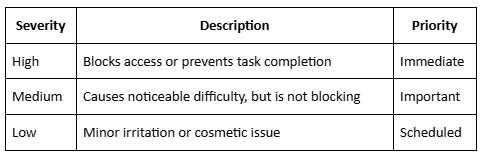
Step 8 — Re-Test and Produce Final Report
After remediation:
- Repeat automated scans
- Repeat manual checks
- Verify assistive-technology behaviour
- Confirm WCAG 2.2 alignment
- Produce a clear internal compliance report
- Publish or update the accessibility statement
Common Findings in Website Accessibility Audits
During audits, teams often discover repeated issues. These include:
- Low contrast
- Vague link labels
- Missing alt text
- Buttons without context
- Keyboard traps
- Improper headings
- Inaccessible pop-ups
- Unannounced dynamic content
- Forms without error messages
- Issues with mobile touch controls
These failures appear across all industries, including e-commerce, finance, healthcare, government, and SaaS.
How Often Should You Perform a Website Accessibility Audit?
The best practice is:
- Quarterly audits
- After any major redesign
- After major content or layout changes
- Before launching new campaigns
- After installing new third-party components
Teams with frequent updates should consider continuous monitoring tools.
Cost of a Website Accessibility Audit
Cost varies based on:
- Site size
- Number of templates
- Component complexity
- Use of dynamic states
- Level of manual testing required
Most businesses invest in hybrid audits to balance coverage and accuracy.
ADA & WCAG Compliance After the Audit
A single audit is not enough. Long-term compliance requires:
- Accessibility baked into design systems
- Team training for content creators and developers
- Regular testing
- Continuous monitoring
- Updating components across design libraries
- Reviewing third-party integrations
Accessibility should function as part of the ongoing product workflow.
Conclusion
A website accessibility audit helps organizations support ADA and WCAG 2.2 requirements while improving user experience for everyone. It provides a structured process for discovering issues, planning fixes, and preventing compliance gaps across fast-changing digital environments.
By combining automated scans, manual testing, assistive-technology review, and documented workflows, teams can reduce accessibility risks, build more usable interfaces, and maintain a consistent, reliable digital presence.
A fully accessible website improves user experience, increases trust, and protects your business from compliance risks.
SB Code Lab’s Accessibility Audit Service gives you a complete WCAG 2.2 report and hands-on fixes to elevate your site’s accessibility.